


VerseLinker Biblian referencianakap enlaces ukar jaqukipaña, hover preview ukamp
Bibliatodo.com ukan 2214 arunakan 3520 jila versiónanakaw utji
What Does It Do?
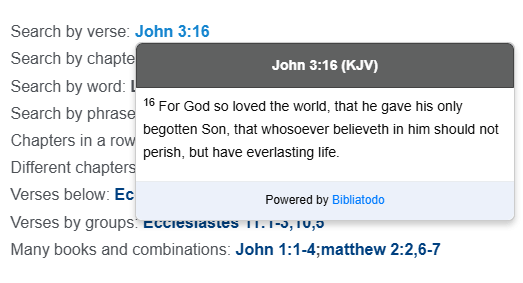
The "VerseLinker" is an innovative free tool designed to easily integrate into your website or blog. Its main function is to automatically identify all Bible references on your page and convert them into interactive links. When hovering over a reference, a pop-up window displays the full verse text, along with a link directing to a more detailed analysis on Bibliatodo.com, enriching your visitors’ experience and promoting the study of the Scriptures.
Test its functionality by hovering over the highlighted Bible references below:
Uka jaljanakarjamaw thaqhañama: Salmos 91 ukat juk’ampinaka
Mä fila jaljanaka: Salmos 91-93 qillqatanaka
Kunayman jaljanaka: Salmos 91,94 qillqatanaka
Aka aynachan utjki uka jiskʼa tʼaqanaka: Eclesiastés 11:1-7 qillqatanxa
Tamanakjam jiskʼa tʼaqanaka: Eclesiastés 11:1-3,10,5 qillqatanxa
Walja libronaka ukat combinaciones:
Juan 1:1-4;Mateo 2:2,6-7
For example, if your page contains a reference like John 3:16, the plugin will automatically identify and link it. Eclesiastés 11:1-7 qillqatanxa, Juan 3:16 qillqata. Once detected, these references are converted into interactive links, and a pop-up window is enabled to display the full verse text.
You can customize the default Bible translation and configure other options according to your preferences. The script also recognizes valid abbreviations of Bible versions related to the reference, such as: Juan 3:16 qillqata (AYOP). Note that the abbreviation must be in parentheses to be detected; otherwise, the default version will be used.
This script also supports other styles of Bible references, which will be automatically identified, such as: Eclesiastés 11:1-3,10,5 qillqatanxa y Juan 1:1-4;Mateo 2:2,6-7.
How to Install the "VerseLinker"?
There are two installation methods available: as a script on any website or as a WordPress plugin. Check out the detailed instructions on our website to easily integrate the tool on both platforms.
Important Notes on Usage
Review the additional notes available on our website to ensure proper link integration and optimize the functionality of the "VerseLinker" on your page.
Practical Tips for Better Use
The script displays a maximum of seven verses per reference. If the range is greater, a "More »" link will be added, directing to the full chapter on BibliaTodo. For optimal experience, configure the translations correctly using the option "KJV", ensuring that the content is displayed in the desired language.
Multi-Language Support
The "VerseLinker" is fully compatible with multiple languages, allowing you to customize the experience to your audience’s needs. During installation, make sure to select the correct language so that the references and translations are appropriately adapted to your website.
If you select the option "All languages", the script will automatically detect the base language of your website using the lang attribute in the HTML tag, such as lang="es", lang="en", lang="fr", and others. It is important that your website includes this tag properly configured for each language. If you encounter any issues, feel free to contact us via WhatsApp at +18586483531, where we will be happy to assist you.
When choosing the option "All languages", the default Bible version in the detected language will be automatically used, ensuring a consistent and localized user experience.
WordPress Installation Guide
To install the WordPress plugin, download the "VerseLinker" from our website. Access the WordPress admin panel, go to the "Plugins" section, and click on "Add New". Follow the step-by-step instructions to complete the installation quickly and easily. In just a few minutes, you’ll have this powerful tool enabled on your website.